
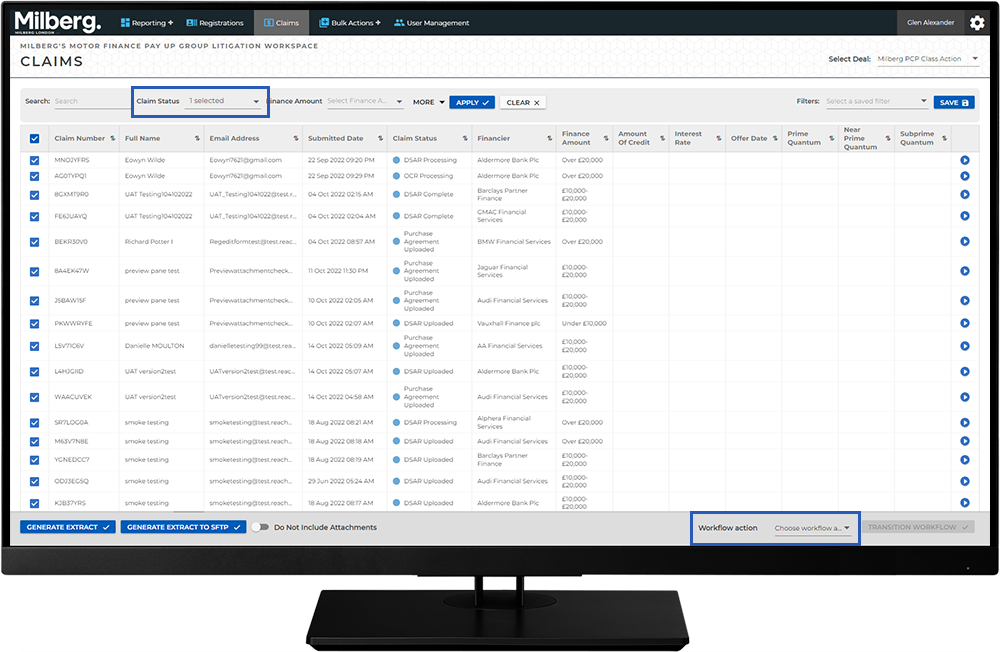
Conducting Work in the Workspace - How To: Workflow Actions: Step 6 of 7
Set the Claims Status to Reject a Claim
For a set of multiple claims:
- Select the Claims menu
- Run a search or saved filter to locate all claims with a Claim Status of Claim Verification and there are NO quantum values provided
- Select all records returned
- From the Workflow Action list select Claim Verification -> Rejected
- Select the Transition Workflow button to update these records to Rejected
At this time the system automatically sets the Registration Status to Inactive and sends an email to the client the claim is rejected.
For a single claim:
- Select the Claims menu
- Run a search on the name of the client or other field such as Registration ID
- Select the View Details button
- Select the Rejected button for this claim
At this time the system automatically sets the Registration Status to Inactive and sends an email to the client the claim is rejected.